
Chrome Extension for Smarter Candidate Sourcing
Overview
TalentSeer Sourcing Assistant for Chrome is a browser extension designed to streamline the candidate sourcing process for recruiters. Built specifically for LinkedIn, the tool enhances the job search workflow by automatically matching candidate profiles to relevant job openings within the user’s talent database. This automation reduces manual effort, helping recruiters identify and prioritize qualified candidates more efficiently. The software is particularly useful for professionals managing multiple roles or large-scale hiring campaigns.
By integrating directly into the LinkedIn browsing experience, the extension enables real-time candidate evaluation without requiring context switching. Users can view candidate scores, access contact information such as email addresses, and explore additional social profiles like Facebook, Twitter, and Google+. These features support faster outreach and more informed hiring decisions. The tool also centralizes candidate data, allowing users to manage prospects per job and export profiles in various formats, including .csv.
Target users include recruiters, talent acquisition specialists, and HR professionals who rely on LinkedIn for sourcing. The developer, TalentSeer, focuses on recruitment automation and talent management solutions. The extension is free to use, making it accessible for individuals and small teams. Its primary use case involves accelerating the initial screening phase of hiring by combining job matching, contact discovery, and centralized management in a single interface.
Key Features & Capabilities
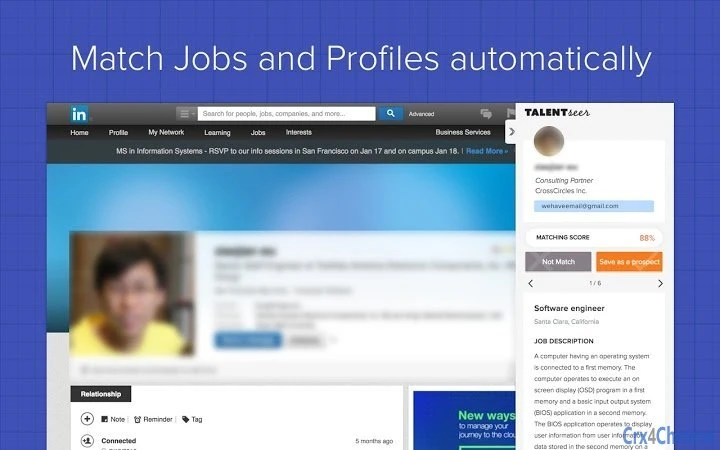
- Automated Job Matching: When viewing a candidate’s LinkedIn profile, the extension automatically compares their background against all active job openings in the user’s system, providing a relevance score. This enables quick assessment of fit without manual cross-referencing.
- Contact Discovery: The tool identifies and displays candidate email addresses and links to other social media profiles, including Facebook, Twitter, and Google+. This helps recruiters initiate outreach with verified contact details.
- Centralized Candidate Management: All sourced candidates can be organized by job role, with options to store and track interactions. This supports a structured approach to talent pipeline development.
- Exportable Data: Users can export candidate profiles to .csv and other common file formats, facilitating integration with CRM systems or spreadsheets for further analysis.
- Talent Pool Building: The extension allows users to create and maintain a personalized talent pool, which can be reused across multiple hiring cycles.
These features are particularly valuable during high-volume recruitment periods. For example, a recruiter reviewing 50 LinkedIn profiles in a day can use the extension to instantly see which roles each candidate matches, extract contact details, and save them to a dedicated job-specific list. This workflow reduces time spent on repetitive tasks and improves consistency in candidate evaluation.
User Interface, Workflow & Performance
The TalentSeer Sourcing Assistant integrates seamlessly into the Chrome browser, appearing as a small icon in the toolbar. When a user navigates to a LinkedIn profile, the extension overlays relevant data such as job match scores and contact details directly on the page. The interface is minimalistic and non-intrusive, designed to enhance rather than disrupt the browsing experience.
Navigating between candidate profiles and job lists is straightforward, with intuitive controls for saving, filtering, and exporting data. The workflow is optimized for speed—users can save a candidate with a single click and assign them to a specific job. The extension does not require additional login steps during browsing, which improves efficiency.
Performance details were not specified by the developer. However, based on general behavior of browser extensions, the tool operates in the background and should not significantly impact browser performance under normal use. The developer did not provide information on CPU or RAM usage. Stability is expected to be consistent with typical Chrome extensions, but exact behavior may vary depending on system configuration and the number of open tabs.
Compatibility & System Requirements
TalentSeer Sourcing Assistant is compatible with Windows and Mac operating systems. It functions as a Chrome extension, meaning it requires the Google Chrome browser to operate. The extension is available through the Chrome Web Store, and installation is straightforward via the browser’s extension manager.
Exact system requirements were not listed by the developer. The installation size is not publicly disclosed. Users should ensure their system meets the standard requirements for running Chrome, including sufficient disk space and a stable internet connection. Compatibility with other browsers or platforms has not been confirmed.
Pros and Cons
Pros
- Free to use with no hidden costs
- Seamless integration with LinkedIn and Chrome
- Automated job matching improves sourcing speed
- Direct access to candidate email addresses and social profiles
- Centralized management of candidates by job role
- Supports export to common file formats for further use
Cons
- Requires Chrome browser; not available for other platforms
- Limited to LinkedIn as a source; no support for other job boards
- Exact system requirements and performance impact not disclosed
- Dependent on TalentSeer’s backend infrastructure for job matching
FAQ Section
Is TalentSeer Sourcing Assistant available for browsers other than Chrome?
The extension is currently only available for Google Chrome. There is no official support for other browsers such as Firefox, Edge, or Safari.
Is the software safe to use with my LinkedIn account?
The extension operates within the scope of Chrome’s permissions and does not store sensitive data locally. It accesses LinkedIn profiles only when the user is actively viewing them. Users should review the extension’s permission requests before installation.
How often does the software update?
Updates are released periodically by the developer to improve functionality and compatibility. Users are encouraged to keep the extension enabled and up to date through the Chrome Web Store.
Can I use this tool offline?
Offline functionality is not supported. The extension requires an active internet connection to access job data, match candidates, and retrieve contact details.
What type of license does TalentSeer Sourcing Assistant use?
The software is free to use with no licensing fees. It operates under a freemium model, with core features available at no cost.
Final Thoughts + CTA
TalentSeer Sourcing Assistant delivers a focused, efficient solution for recruiters who rely on LinkedIn for talent acquisition. Its ability to automate job matching, extract contact information, and centralize candidate data significantly reduces time spent on sourcing tasks. The free model makes it accessible to individual recruiters and small teams without compromising on core functionality.
While the extension is limited to Chrome and LinkedIn, its streamlined workflow and practical features make it a valuable addition to any recruitment toolkit. For professionals managing multiple roles or seeking to improve the speed and accuracy of candidate outreach, this tool offers tangible benefits.
Download TalentSeer Sourcing Assistant now







